

If you use LinkedIn, and you should, then you are aware of the power (and complexity) of the application. It’s far more than a business communication tool. It has become the premier platform for developing solid business contacts and building relationships. And the kicker is that LinkedIn adds new features and enhancements almost weekly. So you can’t tune in once-a-something and expect to keep up.
Recognizing the impact of LinkedIn on today’s business centers, ABCN has invited Viveka Von Rosen, recognized as one of the most influential social media experts, to speak at the upcoming ABCN Summit in Key Largo on May 22-24th. Below is an extract of Viveka’s presentation we thought you would find insightful and helpful.

_________________________________________________________________________________________________
7 LinkedIn Strategies to Prepare for Events, Meeting and Conferences
Viveka von Rosen, Author “LinkedIn Marketing: An Hour a Day”
Since I am known internationally as “The LinkedIn Expert” it probably goes without saying that I am a huge social media fan. That being said, nothing really beats a face-to-face meeting for building camaraderie and developing business relationships. The best of both worlds is when you combine the two before (and after) an event!
Here are 7 LinkedIn Strategies you can implement right away to prepare for the next business or networking event you will attend (Like ABCN’s Annual Conference in Key Largo!):
1) Discovering Who in Your Network Lives Where You are Going
2) Joining the Association’s LinkedIn Group
3) Finding Out Who Else In Your Network Is Talking About The Event
4) Getting Strategic Introductions
5) Keeping Track Of Your Contacts And Relationships Prior To and After The Event
6) Finding Out Who Else Is There On Business
7) Managing Those Pesky Business Cards
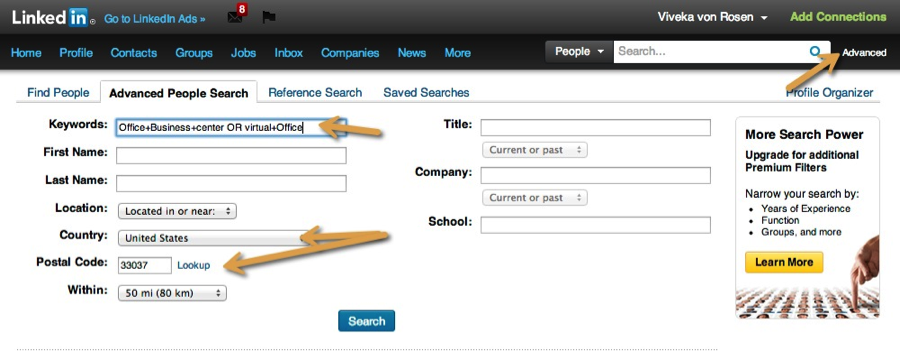
1. Use the Location (postal code) Search
I don’t know about you, but I simply don’t have the brain capacity to remember my entire network, much less where they live. Use the location search in LinkedIn’s Advanced Search to find people in your network that you know (but might have forgotten you knew) in the cities you are traveling to (like Key Largo and surrounding areas). This is especially useful for big networks like mine – but my clients with smaller networks also find this strategy helpful.
I just want to kick myself when I get back from a business trip or vacation and realize I missed out on meeting one of my good social media connections face to face because I didn’t do a really quick advanced search on LinkedIn before planning – or even heading out on my trip!
Here’s how you do it:
- Click on “Advanced” to the right of the search bar
- Type in the Country/Zip code you are going to
- Sort by Connections
- Send a quick message to 1st level connections and shared group members to let them know you will be in town and when.
2. Join the Event/Association Group
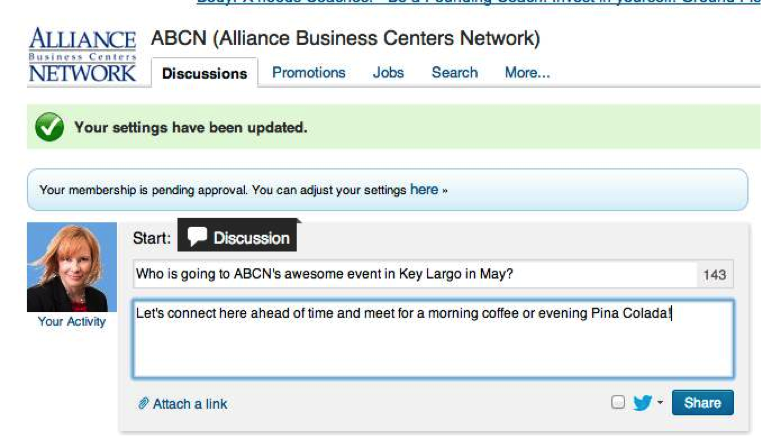
If you are going to an event hosted by an association (say ABCN), especially one you are a member of, check to see if that association has a group on LinkedIn. Then you can just join the group and once you are accepted, post in the group discussion section that you are going to the event and invite other members not only to meet you there, but connect with you ahead of time. Because you are in the same group, it’s MUCH easier to send invitations and messages to each other.
3. Use LinkedIn Signal
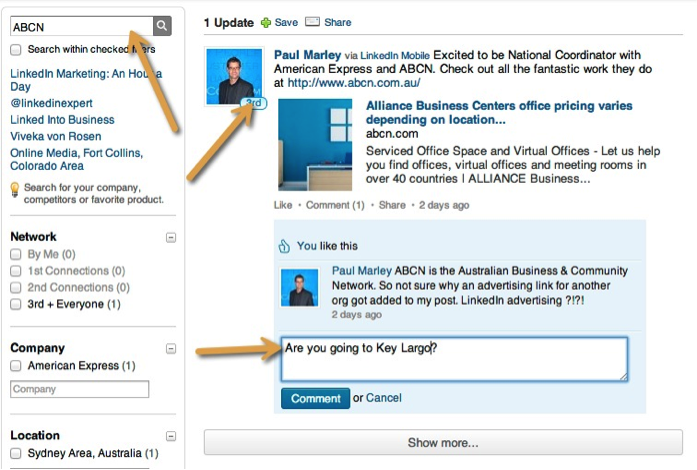
If you go to www.linkedin.com/signal, you can search member’s updates by keyword. And also by location. See who is posting updates about the event you are going to – or in the city you might be traveling to. The nice thing about Signal is that you are not restricted by relationship. As long as someone’s post shows up, you can like, comment on and share it. And that starts the engagement process.
4. Get Strategic Introductions
With LinkedIn you can now search your connection’s connections for the folks you would like to connect with! So make sure you are first level connections with the event coordinator, and then see who in their network you would like to be introduced to. Just be conservative. Don’t flood the poor person with Introduction requests every day until the event! And use the Introduction application on LinkedIn – take the initiative. One introduction a week is plenty!
You might also consider a tool called BizIntro. Its brand new and still in beta mode, but looks like it might be a great tool: Beta.bizintro.com
5. LinkedIn Contacts
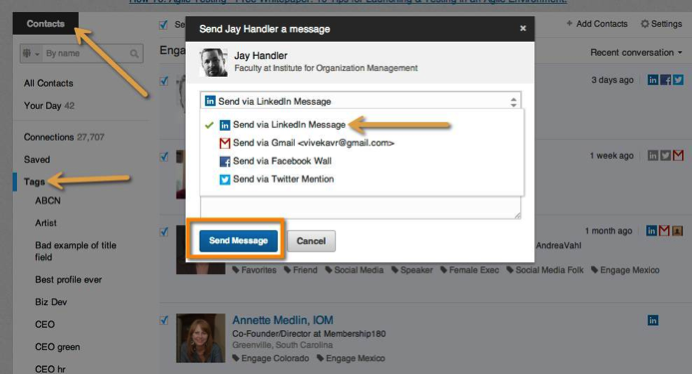
LinkedIn finally has a (sort of) CRM. So once you begin to engage with folks going to the conference, you can keep track of your interaction with them!
You can also “Tag” them, which allows you to put them all into one easily source-able group. You might even keep up with everyone by sending bi-weekly or monthly messages on what you find interesting, questions you have about the event, suggestions you have about engagement, etc.
If the event has created a list of speakers, see if they are on LinkedIn, invite them to connect, Tag them as Event speakers, and keep abreast of their activity. That might seem a little stalker-y, but I bet they’ll be impressed when you finally meet them and refer back to their latest blog post, book or interview!
6. Use the Here on Biz iPhone app (Android coming soon).
Don’t know HereonBiz.com? You should! It’s an amazing app that shows you who in your network is in or near the town you are in or event you are attending. So even if you forget to do an Advanced Postal Code search, you can still get similar information on your phone. And even send a message or connect with the person on LinkedIn right from the same screen!
7. Use the Cardmunch App (Apparently there is also an Android app…)
Cardmunch allows you to take a snapshot of a business card, and then invite them to connect, or send them a message, or an email, or phone them, right from your screen. It’s a great way to manage and keep in touch with other event participants.
In conclusion – there are many ways to use social media to meet and engage with other association members and event participants, but I have found these seven techniques will help you to strategically keep in touch before and after an event – resulting in real and lasting relationships! So feel free to connect with me before, during or after the ABCN Annual conference at www.linkedin.com/in/linkedinexpert